

Live streaming is one of the best ways to earn money on Hala Live. The job is very simple: just go live, talk to new people from all over the world, and get virtual gifts from your viewers. What makes this app special are the extra rewards it offers. When you become a Hala Live host, you get daily bonuses, monthly events, and money from private calls. You will not find these great perks anywhere else! Ready to start? Let’s look at the simple steps you need to follow to get your account set up today.
How to Become Hala Live Host (Step-by-Step)
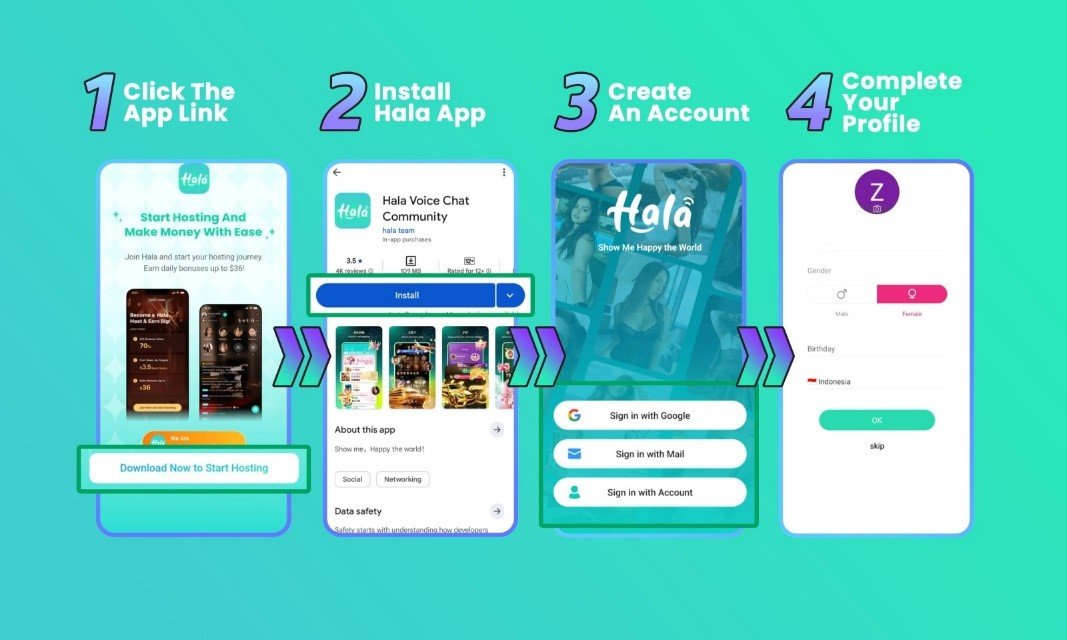
1. Open the Link
Start by clicking our referral link right here. This link will give you a button to download the app and begin your sign-up.
2. Download the App
After you open the link, scroll down and click the download button. This will take you directly to the Play Store or App Store to get the app.
3. Fill Out Your Basic Profile
The app will ask for your basic details. Carefully type in your name, gender, date of birth, and country.
4. Click ‘Complete’ to Finish
Once your info is correct and you upload a real, clear photo of yourself, tap the OK button. Now, great job, your registration is a success!
Fixing Hala Live Host Registration Problems
- Picked the wrong country?
You cannot change this info after you make your account. If you make a mistake here, you must create a completely new account with the right details.
- Cannot access the registration link?
Make sure you click the official link on this page. Our link works for both iPhone and Android. If the page will not load, try to turn off your ad blocker for a minute, switch your internet from Wi-Fi to mobile data, or refresh the page.
- Having trouble uploading a photo?
If the app rejects your picture, it usually means the photo looks edited. Your first sign-up photo must be 100% natural. No filters! After your account is approved, you can change your profile picture to any edited photo you like.
Hala Live Host FAQ
- Can I fix a spelling mistake in my username?
Yes, do not worry! You can change your username at any time in your profile settings.
- Can I have two host accounts on one phone?
No. Hala Live strictly allows only one host account for each phone.
- Is screen recording allowed during live streams?
No. To keep you and your viewers safe, Hala Live turns off screen recording for everyone on the app.
Welcome! Your Journey Starts Here
Signing up to become a Hala Live host really is that fast and easy. If you followed the steps above, congratulations! You are now an official host, and you can start making money right away.
Do you still have questions about how to start, use the app, or get your daily bonuses? Our support team is always happy to help. Reach out to us anytime! Also, be sure to check out our blog for more easy tips to help you succeed on Hala Live.